Between the Console and the Clock: What to Walk Into the Venue With on Day One
And why the work you do before it decides how tech goes.
Day one is a strange mix of excitement and chaos.
The rig is hung. The console is booted. The designer is on their way.
And you're staring at a blank show file.
Whether it's a Broadway house, a cruise ship theater, a broadcast studio, or a corporate ballroom, that moment looks the same.
You can't pre-build the design. You haven't heard the ideas yet.
But you can walk in with a framework.
In the last article, we talked about how much of a commercial tech happens before the room becomes expensive. This is what that preparation actually looks like.
The goal is simple. Spend day one on the design, not on the file.
Start with an organization plan
Before you touch a fixture, decide where everything is going to live.
Presets or palettes. Channeling. Groups. Effects.
Not as you go. Before you arrive.
Every time you stop to think about where something should be stored, the room is waiting on you.
Ask yourself:
- Where do color, focus, and beam data live, will it be referenced and how are they numbered?
- How is the rig channeled, and will I be able to find a fixture without thinking?
- What groups do I need on day one, and which can wait? Where will I find them?
- Where do my effects live, what will their naming conventions be and how will I find them quickly?
There's no single correct answer. The right system is the one you can navigate without thinking, under pressure, while someone is asking for a change.
Keep it consistent from show to show. When your numbering and structure stay the same, your hands already know where things are.
Leave room to grow. Every show adds something you didn't plan for.
Channeling and groups are where the plan meets the paperwork. Build them from the plot, then expect to adjust after the first day of tech. Your structure should survive that adjustment.
Effects are no different. Build a base library ahead of time and test it across more than one fixture type. Stock effects are most useful when they are detached from a particular set of fixtures. They need to work across multiple selection orders, groupings, and targets.
Walk in with the skeleton. Be ready to adapt the rest based on what the designer really needs.
A color library you can trust, and names that make sense
Color is the first thing most designers ask for. It's also the first thing that slows rooms down.
Build your color library before day one.
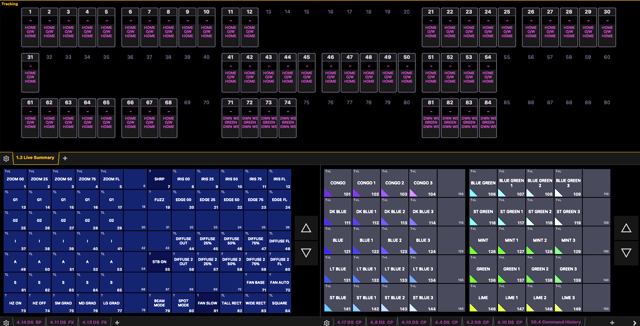
Primaries and secondaries. Pastels and deep saturates. A full range of whites. The colors designers reach for constantly.
One of the biggest things missing from my color library as a young programmer was low saturation colors. Do not underestimate them. Try to light a book scene on Broadway and you'll quickly see why.
Then do the part that takes time: make them match.
A color that looks right on an LED fixture may look nothing like it on a discharge fixture. If you don't solve that before the designer is looking at the stage, you'll solve it while they wait.
Color palettes built by a macro often end up matching on paper but not on stage. This is where a little bit of extra time goes a really long way.
Then there's naming.
Label things like someone else will need to understand them.
Designers talk in gel numbers, colors, and moods. Your names should be something you can find quickly and recognize at a glance. Short. Consistent. Searchable.
It sounds small. It isn't.
When the designer says "go back to that blue from before," a clean naming system is the difference between finding it in three seconds and scrolling for thirty.
Good names also protect you when you hand a file off, pick it up months later, or have a substitute step in.
If you can't tell what something is without opening it, it's named wrong.
Build the tools before you need them
The best time to build a tool is before anyone is asking for it.
Beam palettes.
Start with the beam looks you'll reach for every day: tight, medium, and wide. Open and gobo'd. A few frost levels. Treat them as starting points, not final answers.
Shutter controls.
Shaping a special, squaring off a look, or cutting light off a piece of scenery happens constantly. Have a few common shutter positions ready so a shape is one touch away instead of a series of adjustments.
Magic sheets and layouts.
This is where all of it comes together. A clean layout gives you your groups, systems, and palettes on one screen, laid out the way the rig is laid out.
Build it so the most common requests take a single touch. These should also be the ones that are most directly in front of you. If you put your focuses on the monitor furthest away, you're only going to slow yourself down.
The designer won't know how your file is built. They'll just notice that things happen quickly.
That's the point.
Your macros need to be your macros
There's no shortage of macros available online.
Some of them are great. Download them, read them, and learn from them.
But don't walk into a room relying on a macro you don't understand.
If it breaks, you won't know why. If a console update changes how it behaves, you won't know where to look. If the designer asks for a slightly different version, you can't adjust it.
And all of that happens while the room is waiting.
A macro you built yourself is different. You know every step. You know what it assumes about your selection and your file. You know what to change when something goes wrong.
That doesn't mean you need to build everything from scratch. Reading someone else's macro is a great way to learn. Then rebuild it yourself, one step at a time, until you could have written it.
I recently took over for a colleague to finish a day of notes on a production. These handoffs are always tricky.
You have a choice. Spend time setting up the console your way, or save that time and adapt to theirs.
I adapted. It did save time, but it came with a catch.
Whenever I needed to mark a cue, I reached for their mark macro. It didn't always work the way I expected.
Of course, how I expect a mark macro to work might not be how they would build it. Neither one is wrong. We each have our preferred way.
For a while, I was marking everything manually instead.
Eventually I figured out why. Their macro was written to be used in blind.
Everything it assumed was built around that. Once I knew that, it worked exactly as intended.
I lost time because I was using a tool without knowing what it assumed.
A key skill of a programmer is knowing what will happen to the rig before you execute a command. A macro you didn't build takes that certainty away.
That's why it's so important to use macros you've actually written yourself.
Keep your macro list short. Build macros for the things you do over and over, not for everything you could possibly automate.
If you couldn't rebuild it from scratch, don't trust it in the room.
Prep time isn't free, and your library is yours
A lot of this takes time.
That time is real work.
You shouldn't be expected to do it for free.
It's easy early in your career to treat prep as a favor, something you do on your own time to make a good first impression. But prep is part of what a production is paying for: a file that's ready by the time the room gets expensive.
Bring it up when you take the job, not after you're in the room. How much prep time does this show need, and is it part of the deal?
There are really two kinds of prep.
Show-specific prep is patching, channeling, building groups from the plot, and tailoring layouts to this rig. That belongs to the production, and it's worth negotiating for.
Your library is different. Your color library, beam palettes, shutter looks, effects, macros, and layouts are yours. You've built them over years of shows, consoles, and fixture types, and you carry them from job to job.
That's why prep for a new show doesn't start from zero. You're borrowing from yourself.
Building that library is on you. Applying it to this show is work you should be paid for.
Every show adds to it. A fixture you hadn't used before. A console quirk you won't forget. A color that finally matched.
Keep what worked, and keep it somewhere you can find it.
Start from your own library, then tailor it to the rig in front of you.
Walk in ready, then let it go
Everything we've talked about is a framework.
It isn't the design. It will change. Parts of it will get thrown out by lunch.
That's fine.
The point of preparation isn't to protect your work. It's to free up your attention.
Every minute you don't spend wondering where something lives is a minute you can spend listening.
A good file doesn't make you faster at the console.
It makes the room faster.
This is the fourth entry in the series, Between the Console and the Clock. We cover topics not typically discussed about working as a Moving Light Programmer to help demystify this important role. DM Jonah on Instagram @jonahcamiel with any topics you're interested in hearing more about! See the entire Between the Console and the Clock Series here.
Jonah Camiel is a New York City-based Moving Light Programmer originally from Boston, Massachusetts. He is a graduate of the production and design program for stage and screen at Pace University. Selected Broadway: Beaches, Every Brilliant Thing, The Wiz, Peter Pan Goes Wrong, Into the Woods, POTUS, Thoughts of a Colored Man. Selected National Tours: Jersey Boys 25th Anniversary Tour, The Wiz, Mystic Pizza, Clue, Come From Away, Into the Woods, Ain't Too Proud. Other notable projects: Broadway Bares, Norwegian Cruise Lines, Virgin Voyages, CNN Studios, Food Network Studios, PGA Tour Studios, Love Island USA Reunion. www.jonahcamiel.com